Best Free Animation Software for 2025: Create Stunning Videos Without Spending a Dime
Animation brings stories to life. It grabs attention and sparks creativity. Whether you’re crafting explainer videos or cinematic transitions, free animation software makes it possible without breaking the bank. These tools suit beginners and pros alike. They support 2D animation, 3D modeling, and even character rigging. In this article, we explore the top free animation programs for 2025. You’ll find options for every skill level and project type. Let’s dive into the world of animation and uncover tools to boost your creative workflow.
Why Choose Free Animation Software?
Free animation software saves money. It offers powerful features for video content creation. Many tools rival paid options like Adobe Creative Cloud. They support vector workflows, bitmap artwork, and digital painting. Open-source programs evolve fast with community input. You get flexibility for projects like animated GIFs or character puppets. These tools work on Windows, Mac, Linux, and even mobile devices. They meet user needs for ease of use and robust functionality.
Animation enhances social media engagement. It improves customer retention and SEO ranking. Videos with motion paths or visual effects draw viewers in. Free tools let you experiment without financial risk. They’re ideal for students, hobbyists, and digital creatives. Let’s explore the best options available in 2025.
Top Free Animation Software for 2025
1. Blender: The Ultimate Open-Source Powerhouse
Blender tops the list for versatility. It supports 2D and 3D animation workflows. You can model, rig, animate, and render in one app. Its rendering engines, Cycles and Eevee, deliver stunning visuals. Blender’s Grease Pencil tool blends 2D artworks with 3D environments. It’s perfect for character animation and visual effects.
Key Features:
- Advanced 3D modeling and texture mapping.
- Motion tracking and particle effects.
- Extensive plugin library for customization.
- Cross-platform support: Windows, Mac, Linux.
Blender suits pros and beginners. Its community offers free tutorials. You can create everything from explainer videos to full 3D movies. Download it from blender.org and start animating today.
2. Pencil2D: Simple 2D Animation for Beginners
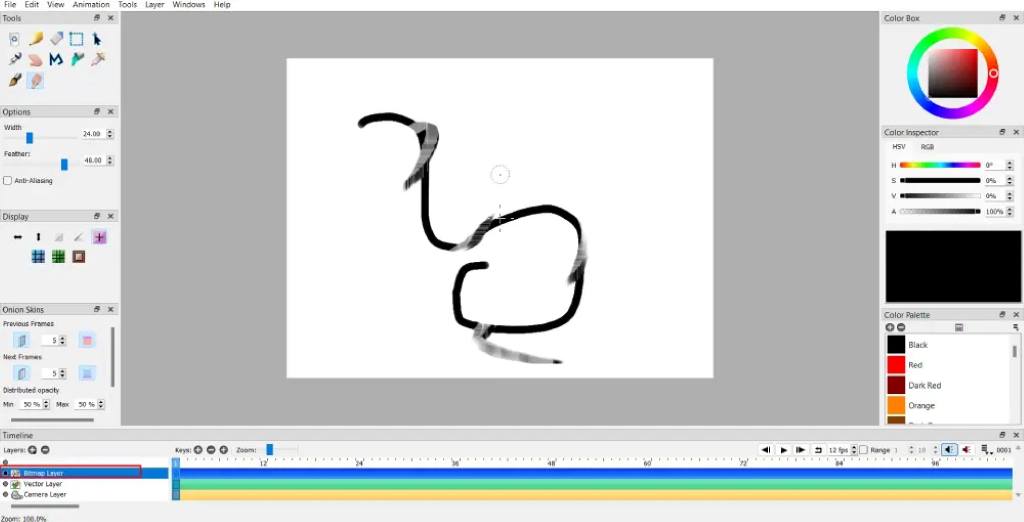
Pencil2D excels in hand-drawn 2D animation. Its minimalistic interface ensures ease of use. You can switch between raster and vector workflows. It supports keyframe and timeline interfaces. Onion-skinning helps track frames for smooth animations.
Key Features:
- Lightweight and fast performance.
- Supports bitmap and vector artwork.
- Imports and exports animated GIFs.
- Available on Mac, Windows, and Linux.
Pencil2D is ideal for cartoonists. It lacks advanced features but shines for simple projects. Beginners love its intuitive design. Visit pencil2d.org to download it free.
3. Synfig Studio: Vector-Based Animation Excellence
Synfig Studio offers film-quality 2D animation. It eliminates frame-by-frame drawing with vector tweening. You can transform shapes automatically between key positions. Its bone system supports character rigging and skeleton distortion. Synfig provides over 50 layers for complex artwork.
Key Features:
- Vector-based, scalable animations.
- Advanced bone system for puppets.
- Layers for gradients, filters, and distortions.
- Cross-platform: Windows, Mac, Linux.
Synfig suits animators seeking flexibility. It’s great for professional-grade projects. Download it from synfig.org and explore its robust tools.
4. OpenToonz: Studio Ghibli’s Choice
OpenToonz powers Studio Ghibli’s iconic films, like Princess Mononoke. This open-source software supports commercial and non-commercial projects. Its GTS scanning tool handles hand-drawn art. You can add effects like wavy distortion or incident light. OpenToonz excels in digital painting and frame-by-frame animation.
Key Features:
- GTS scanning for hand-drawn art.
- Plug-in effects for advanced visuals.
- Supports TWAIN standards for scanning.
- Available on Windows, Mac, Linux.
OpenToonz is perfect for traditional animators. Its Studio Ghibli roots ensure quality. Get it free at opentoonz.github.io.
5. Krita: Hand-Drawn Animation with Brush Stabilizers
Krita shines for hand-drawn animations. It offers over 100 pre-loaded brushes. Built-in stabilizers smooth out shaky lines. Krita supports onion-skinning and frame-by-frame drawing. It’s ideal for tablet users and digital artists.
Key Features:
- Brush stabilizers for smooth lines.
- Supports bitmap artwork and 2D animation.
- Customizable UI for user experience.
- Available on Windows, Mac, Linux.
Krita is great for illustrators. It’s free at krita.org and perfect for creative workflows.
6. Animaker: Online Animation for Beginners
Animaker is a web-based animation editor. Its drag-and-drop editor simplifies video making. You can create 2D, infographic, or whiteboard videos. Animaker’s media library includes premade graphics and sound effects. It supports text-to-speech and voiceovers.
Key Features:
- Six video styles: 2D, infographics, whiteboard.
- Full HD support for crisp visuals.
- Premade templates for quick projects.
- Browser-based, no installation needed.
Animaker is beginner-friendly. It’s great for social media videos. Try it at animaker.com.
7. Brush Ninja: Simple Online Animation Tool
Brush Ninja is a free online animation website. It focuses on ease of use. You can create animated GIFs and Lottie stickers. Its timeline interface is straightforward. Brush Ninja supports anti-aliased lines for smooth visuals.
Key Features:
- Browser-based with no downloads.
- Simple tools for animated GIFs.
- Intuitive timeline for frame management.
- Ideal for quick, fun projects.
Brush Ninja suits casual creators. Visit brush.ninja to start animating.
8. TupiTube: 2D Animation for Education
TupiTube is designed for beginners and education. It offers a simple interface for 2D animation. You can create frame-by-frame cartoons. TupiTube supports bitmap and vector graphics. It’s great for students and hobbyists.
Key Features:
- Easy-to-use for classroom settings.
- Supports keyframe and timeline workflows.
- Cross-platform: Windows, Mac, Linux.
- Free for all users.
TupiTube is perfect for higher education. Download it at tupitube.com.
9. Clara.io: Online 3D Animation
Clara.io is a web-based 3D modeling tool. It supports animation and rendering in the browser. You can create complex 3D scenes without heavy software. Clara.io offers a media library for assets. It’s great for 3D enthusiasts.
Key Features:
- Browser-based 3D modeling and animation.
- Supports texture mapping and rendering.
- Collaborative tools for team projects.
- Free with optional paid upgrades.
Clara.io is ideal for 3D beginners. Try it at clara.io.
10. Powtoon: Animated Videos for Business
Powtoon simplifies animated video making. It offers templates for explainer videos and presentations. Its drag-and-drop editor ensures ease of use. Powtoon’s asset library includes backgrounds and characters. It’s perfect for marketing and social media.
Key Features:
- Templates for quick video creation.
- Supports cinematic transitions.
- Browser-based with no installation.
- Free plan with basic tools.
Powtoon boosts lead generation. Create videos at powtoon.com.
Read Also:
- Mastering the Art: A Comprehensive Guide to the Website Design and Development Process
- The Ultimate Guide to Roblox’s Top Games in 2025
- The Ultimate Guide to the Best AI Tools for Digital Marketing in 2025: Supercharge Your Strategy
Benefits of Using Free Animation Software
Free animation tools offer flexibility. They support diverse projects, from animated GIFs to 3D modeling. Open-source options like Blender and Synfig evolve with community input. You can customize tools for specific needs. These programs reduce costs for startups and creators. They enhance user experience with intuitive interfaces. Many include tutorials for quick learning. Animation improves SEO ranking by engaging viewers. It’s a powerful tool for digital creatives.
How to Choose the Right Animation Software
Consider your project needs. For 2D animation, try Pencil2D or Synfig Studio. For 3D modeling, Blender or Clara.io works best. Check platform compatibility: Windows, Mac, or Linux. Look for features like vector tweening or character rigging. Ensure the interface matches your skill level. Beginners need ease of use. Pros want advanced controls. Test multiple tools to find your fit. Most offer free downloads or browser-based access.
Tips for Creating Stunning Animations
- Plan Your Storyboard: Sketch scenes before animating. It saves time.
- Use Onion-Skinning: Track frames for smooth motion.
- Leverage Templates: Tools like Animaker offer premade assets.
- Experiment with Layers: Synfig’s layers add depth.
- Test Exports: Ensure animated GIFs or videos render well.
- Learn Shortcuts: Timeline interfaces speed up workflows.
- Join Communities: Blender and OpenToonz have active forums.
FAQs
What is the best free animation software for beginners?
Pencil2D and Animaker are great for beginners. They offer simple interfaces and templates. Both support 2D animation and are easy to learn.
Can I create professional animations with free software?
Yes, Blender and OpenToonz produce professional results. Studio Ghibli uses OpenToonz. Blender supports complex 3D animations.
Are free animation tools safe to download?
Most open-source tools like Pencil2D and Synfig are safe. Download from official sites like blender.org or synfig.org to avoid risks.
Do free animation programs work on mobile devices?
Animaker and Brush Ninja are browser-based and mobile-friendly. FlipaClip is a dedicated mobile app for 2D animation.
Can I use free animation software for commercial projects?
Yes, tools like OpenToonz and Blender allow commercial use. Check licensing terms on their official websites.
Conclusion
Free animation software empowers creators. Tools like Blender, Pencil2D, and Synfig Studio offer robust features. They support 2D and 3D workflows for all skill levels. You can craft explainer videos, animated GIFs, or cinematic transitions. These programs save money and boost creativity. Start animating today with a tool that fits your needs. Share your creations on social media to engage audiences. Try one of these free tools now and bring your ideas to life!
References
- Blender Official Website: https://www.blender.org
- Pencil2D Official Website: https://www.pencil2d.org
- Synfig Studio Official Website: https://www.synfig.org
- OpenToonz Official Website: https://opentoonz.github.io
- Animaker Official Website: https://www.animaker.com
- Krita Official Website: https://krita.org
- Brush Ninja Official Website: https://brush.ninja
- TupiTube Official Website: https://www.tupitube.com
- Clara.io Official Website: https://clara.io
- Powtoon Official Website: https://www.powtoon.com